Reducing Cognitive Load in Restaurant Order Entry
I redesigned the product-selection flow for restaurant servers to reduce search time, simplify navigation, and support faster service during busy hours.
- Period
- Jan 2024
Overview
Restaurant servers take orders while doing several things at once. They need to talk to customers, remember earlier choices, handle changes, and add products from different menu sections.
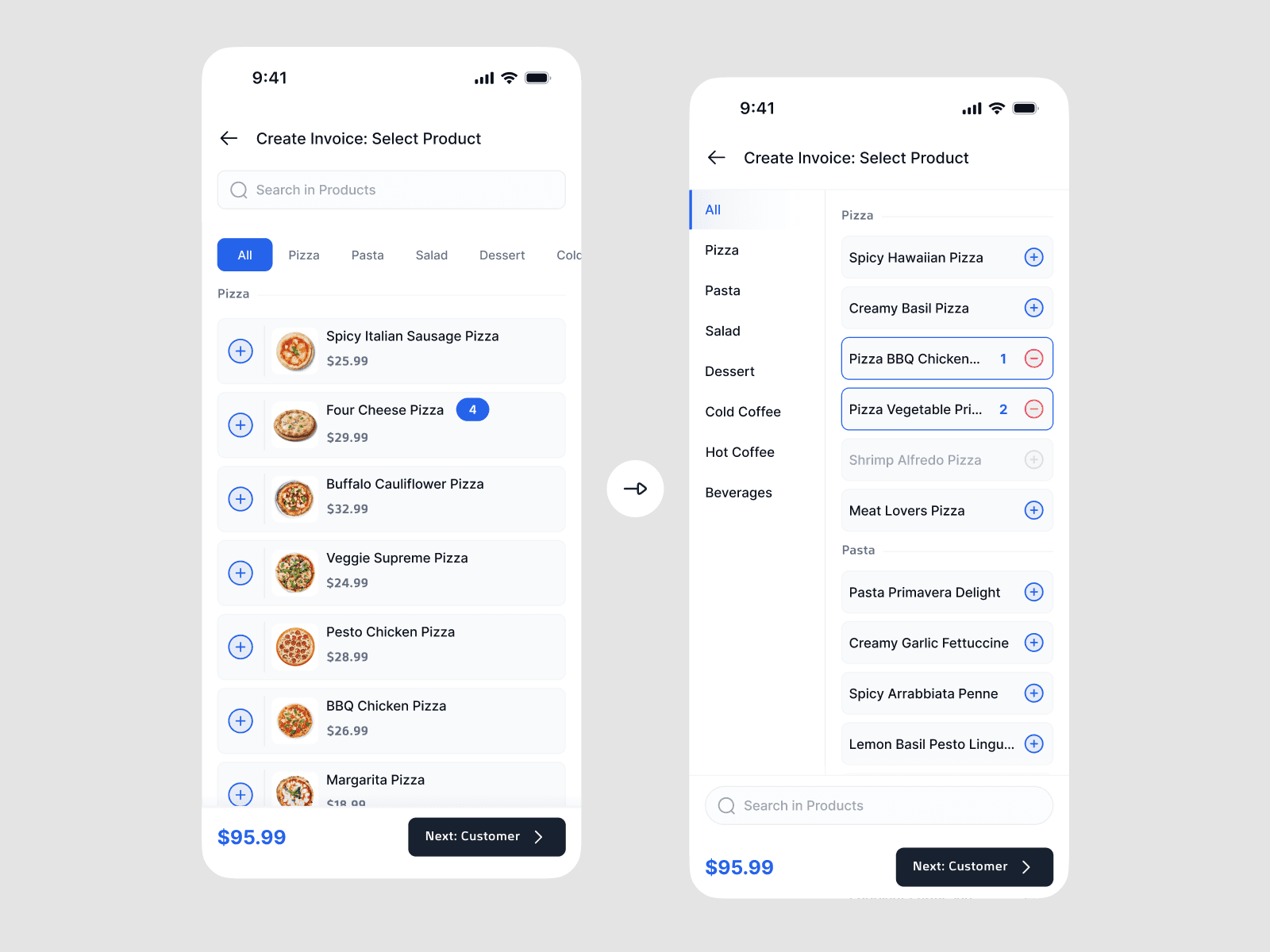
The old order-entry flow made this harder. Categories used horizontal scrolling, product cards showed more information than servers needed, and search was not close to the main order actions.
I redesigned the flow around one goal: help servers enter orders quickly while keeping the order easy to check.
The Problem
The main problem was not only finding a product. Servers also had to remember what had already been added while moving between menu sections and dealing with interruptions.
This created three sources of friction:
- Servers had to scroll sideways to find some categories.
- Extra product information made quick scanning harder.
- Search was available, but it was not easy to find during order entry.
The challenge was to make product selection faster without making the order less accurate.
What I Looked At
I reviewed the current order-entry flow and watched how servers moved between categories and products. I focused on the moments that could slow down an order with items from several sections:
- Finding a category after moving away from it
- Scanning products with different amounts of information
- Moving between the menu and the order summary
- Finding a known product through search
- Checking quantities and the total order
The review suggested that the flow became harder to use when an order included products from several categories. Servers had to remember where products were and keep track of what had already been added.
This project did not include a measured test during a real restaurant shift. I therefore treated these findings as design hypotheses, not final proof of business impact.
Key Insights
1\. Servers cannot give the screen all their attention
Servers need to focus on the customer as well as the order. Menu categories should therefore stay visible and easy to reach.
2\. Adding an item also uses memory
Servers need to remember what the customer has chosen and what is still missing. Keeping the current order visible can reduce this mental effort.
3\. More information is not always more helpful
Extra product details may be useful, but they can make cards slower to scan. When servers already know the menu, they often need to recognize and select an item quickly.
4\. Search and browsing solve different problems
Search helps when a server knows the product name. It is less useful when they are exploring the menu or cannot remember the exact name. Search should support menu browsing, not replace it.
Design Principles
These insights led to four design principles:
- Keep the menu visible — Servers should change categories without losing their place.
- Make scanning easy — The most important information should be clear at a glance.
- Keep the order state visible — Selected items, quantities, and the total should be easy to check.
- Reduce the need to remember the menu — The interface should help servers find products instead of asking them to remember their location.
Choosing a Direction
I considered three ways to help servers find products.
Options considered
Horizontal category tabs
This left more space for products, but some categories could stay hidden. It also made category switching less predictable as the menu grew.
Search-first entry
This could work well for experienced servers who knew the exact product name. It was less useful for browsing or finding a product by category.
A fixed vertical category list
ChosenThis used more horizontal space, but showed the full menu structure at once. It made category switching easier to understand and reduced the need to remember where each category was.
I chose the fixed vertical list because the main problem was not finding one known product. It was moving between several categories while keeping track of the order.
The New Flow
A fixed category sidebar
I moved product categories into a vertical sidebar. Servers can now see the menu structure and change sections without horizontal scrolling.
Simpler product cards
I removed information that was not needed for the first selection. The product name, price, and main action now have the clearest visual focus.
Search near the order actions
I moved search closer to the order summary and the main actions. It is easier to find while building an order, but it does not replace category browsing.
A visible order summary
Quantities, add and remove controls, and the order total stay visible while servers add products. This helps them check the order without leaving the current menu section.